LogoRLU.AI
  • AI Photo Styles
  • Pricing
  • Blog
  • Contact
LogoRLU.AI

Transform your photos with AI. Discover the ReaL U - RLU.AI

Email
Featured on:
aibesttop AI Tools Directory|Featured on ShowMeBestAIFeatured on toolfame.comNextGen Tools BadgeFeatured on Dofollow.ToolsFeatured on saasfame.comAMZdir|Featured on findly.tools
Popular AI Styles
  • All AI Styles
  • AI Age Progression
  • Corporate Headshots Generator - AI Executive Headshot & Professional Business Portrait Maker
  • AI Headshot Background Generator - Professional Headshot Background & Red Background Portrait Maker
  • What to Wear for Professional Headshots - AI White Shirt Professional Headshot Generator
  • Grey Headshot Background - AI Gray Background Headshot & Neutral Background Generator
  • Business Casual Headshots - Free AI Casual Headshots & Casual Corporate Headshots Generator
AI Tools
  • Eyes Follow Mouse
  • AI Headshot for LinkedIn
  • AI Headshot Safety Checker
  • Casual LinkedIn Headshot
  • How to Take a LinkedIn Headshot
  • How to Take a Professional Headshot at Home
  • How to Take a Professional Headshot with iPhone
  • Headshot Prep Planner
  • What to Wear for LinkedIn Headshot
  • Medical Professional Headshots
  • Professional Headshots for Acting
  • Professional Headshot Booth Planner
  • Professional Headshot Cost Estimator
  • Professional Headshot Editing Tips
  • Professional Headshot Guidelines
  • Professional Headshot Pose
  • Professional Headshot Lighting Setup
  • Prompt for Professional Headshot
Resources
  • Pricing
  • Blog
Company
  • Contact
  • Partners
  • Waitlist
Legal
  • Privacy Policy
  • Terms of Service
© 2026 RLU.AI All Rights Reserved.Climate CommitmentTinyLaunch BadgeFeatured on ToolPilot
AI Optional · Booth Operations Planner

Professional Headshot Booth

Use this professional headshot booth page to design a high-throughput event workflow with clear consent steps, delivery logic, and reusable runbook output.

Booth setup inputs

Choose event constraints first, then run the planner.

Upload your photo

Drag and drop or click to browse

Supported formats: JPG, PNG, WEBP (Max 10MB)

Event presets

3

Deterministic mode enabled: this planner works without external AI calls.

Booth readiness output

Get your readiness score, operational checklist, and delivery-ready specs.

Run the planner

Your booth runbook, checklist, and copy pack will appear here.

Templates

Event presets

Apply ready-to-run booth templates for common event scenarios.

Use this preset
Value

Why teams use this planner

Built for event operators who need speed, consistency, and trust.

Operations-first workflow

Focuses on queue, consent, and delivery reliability before visual novelty.

Deterministic by default

No external AI dependency required for core booth planning value.

Share-ready runbook output

Copy summary/checklist directly into ops docs, Slack, or email.

Reusable event presets

Start from known scenarios and avoid rebuilding workflow each time.

Sources

Market evidence references

Sources that informed booth workflow design and risk controls.

Kim Carpenter event headshot booth pricing

Example of service-led event package and throughput framing.

https://kimcarpenterportraits.com/professional-headshots/event-headshot-booth/

Lumetry conference headshot booth page

Shows event booth operational framing and lead-capture messaging.

https://www.lumetrymedia.com/headshotbooth

Dreamwave event headshots

Highlights QR flow, event activation options, and data security claims.

https://dreamwave.ai/event-headshots/

Iris headshot booth overview

Self-serve positioning and instant delivery expectations in market.

https://irisbooth.com/

Snappic AI photo booth

Example of event-operator pricing and deliverable packaging language.

https://www.snappic.com/ai-photo-booth

Decision guide

Professional headshot booth decision guide

Use this checklist before your event opens to attendees.

How many stations do you actually need?

Estimate peak-hour arrivals first, then design lanes so no attendee waits long enough to drop.

What if primary delivery fails onsite?

Always configure one fallback channel (SMS/email/manual link) before event start.

How do you keep outputs consistent across attendees?

Lock background, crop ratio, and naming rule in a preset before opening the booth.

People-first GEO checkpoints

  • - State what attendees get before they upload anything.
  • - Keep one-step path from setup to first usable output.
  • - Show human-readable consent and retention guidance.
  • - Provide share-ready checklist for cross-team handoff.
  • - Avoid absolute claims about speed and quality.

Professional headshot booth examples

Preview sample outcomes before locking your live booth settings.
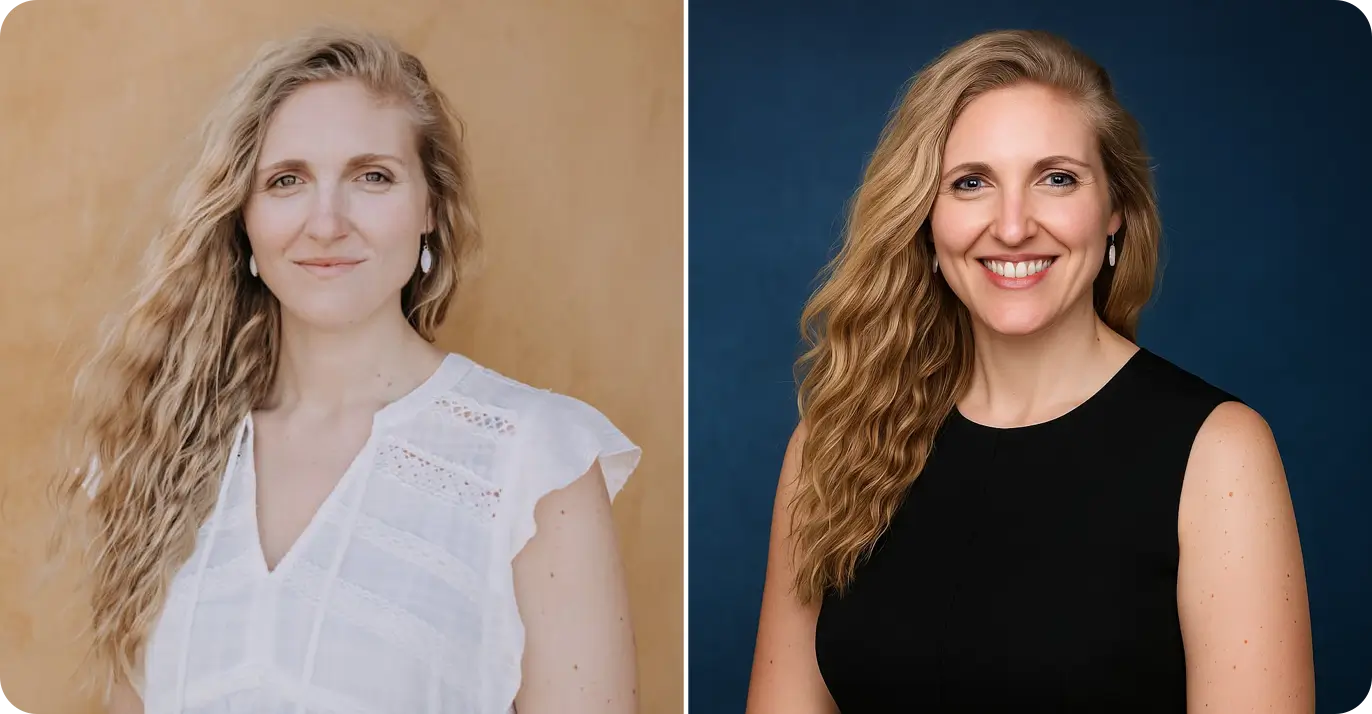
Professional headshot booth example 1 - before
Before
Professional headshot booth example 1 - after
After

Booth style example 1

Workflow

How it works

From setup to shareable output in three practical steps.

  1. 1Step 1

    Set event constraints

    Pick event type, booth goal, expected volume, and delivery mode.

  2. 2Step 2

    Validate consent and rights

    Confirm consent policy and photo rights before running outputs.

  3. 3Step 3

    Generate and share runbook

    Copy the checklist and summary to align your onsite team quickly.

FAQ

FAQ

Answers to common event and booth execution questions.

More tools

Related tools

Continue to prep, safety validation, and final generation workflows.

Headshot Prep Planner

Plan wardrobe, schedule, and shoot-day readiness before events.

AI Headshot Safety Checker

Review privacy, consent, and retention risks before rollout.

Professional Headshot Editing Tips

Build natural-looking post-processing guardrails before publishing.

AI Headshot for LinkedIn

Generate profile-ready headshots after booth planning is complete.

Medical Professional Headshots

Apply compliance-first workflows for healthcare-specific contexts.

Professional Headshot Cost Estimator

Estimate team and per-person budget ranges before booking vendors.

Ready to launch your professional headshot booth?

Use this runbook as your operations baseline, then move into full style generation if needed.

Run planner againExplore AI styles